Skip to content

Website continually being developed

Welcome to Kernow Directory. Organisations supporting adults across Cornwall are continuing to add their details. If you are an organisation, please visit one of our directories and click “Add a listing.”

Our information, advice and guidance pages are co-produced with people who have lived experience and will continue to grow.

How to use this website

Explore the tabs below to help you find top tips on how to use and search this website.

Kernow Directory is a website that helps adults in Cornwall find activities, care, support and advice in one place. Its aim is to help you stay independent, manage your own care and signpost you to information and advice for you and your family. You can find local groups, activities and services within your community as well as care homes and care providers, and other paid services that may help you.

Whether you are a resident or a professional, this guide will help you navigate and get the most from the site.

Kernow Directory has a range of care and support services in Cornwall including:

  • community groups and activities for adults and their families

  • help at home services such as cleaners, gardeners and handymen

  • regulated care at home providers and care homes

  • day opportunities

  • specialist advice and support groups

Kernow Directory also has information pages with useful information on various topics including:

  • staying independent

  • information for unpaid carers

  • services for adults with disabilities

  • equipment around the house

  • mental health and wellbeing for adults and their families

There are different ways you can use this directory to find the information you are looking for.

Toolbar at the top of the page

You can expand the Directories and Information and Advice sections by clicking on the downward arrow and show further categories.
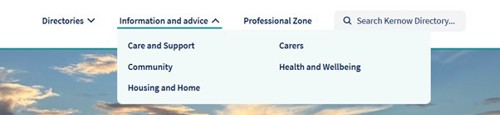
Top toolbar expansion options image

Keyword search

1. Kernow Directory homepage.

2. In the search bar, type a keyword such as 'dementia'.

3. Suggested results will appear below, if you see the one you were looking for you can click on it.
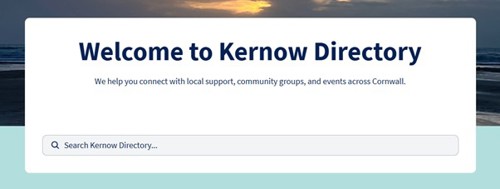
Toolbar search function image

Use the photo icons

You can also click on the tile photos to get more specific results. For example, choose “Health and Wellbeing” will take you to Information, Advice and Guidance pages relating to your health and wellbeing.
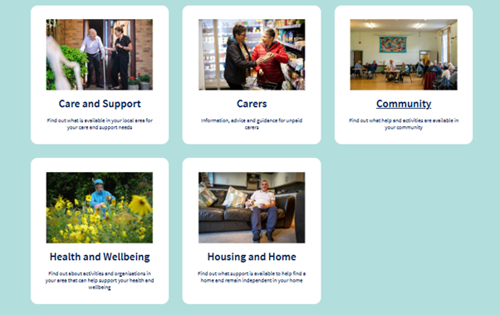
Screenshot of photo tiles

Filters within directories

  1. Go to Kernow Directory homepage.

  2. Click on Directories and choose either Community, Care homes and Care at Home, or Products and Services.

  3. Use the filters on the left-hand side for example: Age Range, Accessibility, In Your Community.

  4. Expand a filter by clicking the arrow icon and choosing options most suitable to you.

  5. Location: enter your postcode and select how many miles radius you would like your search to cover. Click on Show map below, this opens the map and red location icon show you where filtered search results are located.

  6. Click on a red location icon to show more information about the listing and then on the link to take you to the listing. Or you can choose and click on the selected listing below the map.
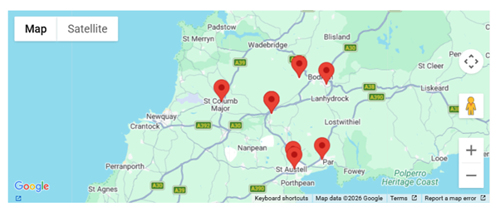
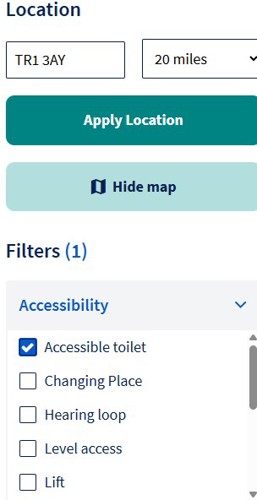
Location map showing filtered resultsScreenshot of location and expanded filters option

7. You can reset your filters and start again by selecting the 'reset filter' button..

Reset filters image

Coming SOON.

If you aren’t sure where to start, use our Information Finder. It will find relevant information, advice and services for you, or someone you support. It is simple to use - you do not need to complete every section. Just click on the sections which are relevant and tick the boxes against the topics you would like help with.

Press ‘Go to results’ at the end. We will provide you with links to information which you can explore now, or email to yourself or someone else.

In the interim, you can navigate the Information, Advice and Guidance content through the Site Map.

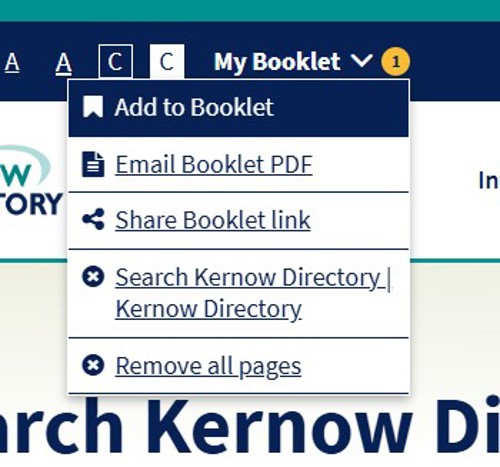
When you are searching in any of the directories, you will see 'Add to favourites' as an option for individual listings on the search results page. Click on this for any listings you want to save to a shortlist. You will see 'Added' appear.  When you have finished adding your favourites, go to the 'My Booklet' button at the top right of the screen to create a booklet. The individual listings will be compiled into a pdf booklet which you can print or email.

Please note if you clear your browsing history, or cookies, your saved booklet will be removed.

Add to my booklet imageMy Booklet screenshotMy Booklet functions image

Providers/Organisations can submit their listing on all three directories if appropriate. 

To add an offer on one or more directories use  ‘+Add a listing’ button. There are added and refined categories and filters that will help users to find the support they need. Please tick all options that are relevant to the listing.

Listings also include the company/organisational logo, supported formats: PNG, JPG, JPEG, GIF, BMP, max size: 1MB.

Kernow Directory team will verify and quality check any change suggestions before the listing is published.

If you want to request a 'Removal of a listing' please email directory@cornwall.gov.uk 

Disclaimer

Whilst every care has been taken in the compilation of this information, Cornwall Council will not be held responsible for any loss, damage or inconvenience caused as a result of using the site and of any inaccuracy or error within these pages.